FEATURE HIGHLIGHTS
Core Capabilities

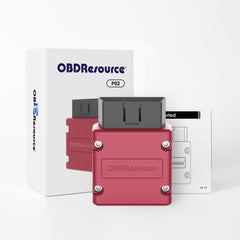
OBDResource P02 Portable Bluetooth VCI Dongle
The OBDResource P02 Portable Bluetooth VCI Dongle is a compact wireless OBD2 diagnostic adapter designed for car owners, DIY users, repair shops, and automotive technicians who need a simple and reliable way to connect their vehicle to a smartphone or tablet.
Built with the original PIC18F25K80 main control chip, the P02 delivers stable communication, reliable protocol recognition, and smooth data transmission for everyday OBD2 diagnostics. Simply plug the dongle into the vehicle’s 16-pin OBD2 port, connect through a compatible mobile app, and start reading vehicle data directly from your phone.
With Bluetooth 4.2 connectivity, support for iOS and Android devices, compatibility with multiple OBD2 apps, and support for major OBD2 protocols, the P02 is an ideal portable VCI dongle for engine diagnostics, check engine light reset, emissions readiness checking, and real-time sensor monitoring.
Key Features
Original PIC18F25K80 Main Control Chip
Equipped with the original PIC18F25K80 chip, the P02 provides stable operation, fast response, and reliable OBD2 protocol communication. Compared with low-quality clone adapters, the original-chip design helps improve compatibility and connection stability.
Bluetooth 4.2 Wireless Connection
The P02 uses Bluetooth 4.2 technology for stable wireless communication with smartphones and tablets. No long cables are required, making vehicle diagnostics cleaner, easier, and more convenient.
Compatible with Multiple OBD2 Apps
Works with the FasLink X App and many other popular OBD2 diagnostic apps that support Bluetooth OBD2 adapters. Users can choose their preferred app for reading codes, clearing codes, viewing live data, and checking vehicle status.
Supports iOS & Android Devices
Designed to work with both iPhone, iPad, and Android smartphones/tablets, giving users flexible device compatibility for daily diagnostics and vehicle monitoring.
Read & Clear Diagnostic Trouble Codes
Quickly read engine diagnostic trouble codes and clear fault codes after inspection or repair. It can help reset the check engine light when the related issue has been properly addressed.
Real-Time Live Data Monitoring
View real-time vehicle sensor data such as oxygen sensor readings, engine coolant temperature, exhaust gas temperature, throttle position, boost, vehicle speed, fuel trim, and more depending on vehicle and app support.
I/M Readiness for Emissions Check
Check I/M readiness status before a smog test or emissions inspection. This helps users understand whether the vehicle’s onboard monitors are ready.
Wide OBD2 Protocol Compatibility
Supports major OBD2 protocols including:
- SAE J1850 PWM
- SAE J1850 VPW
- ISO9141
- KWP2000
- CAN
Compact Portable Design
Small, lightweight, and easy to carry. Keep it in your glove box, toolbox, or service vehicle for quick diagnostics anytime you need it.
Typical Applications
- Reading engine diagnostic trouble codes
- Clearing engine fault codes after repair
- Resetting check engine light
- Viewing real-time sensor data
- Checking I/M readiness for emissions inspection
- Monitoring vehicle performance through compatible apps
- Basic OBD2 diagnostics for cars, SUVs, and light trucks
Who Should Use This Tool
The OBDResource P02 Bluetooth VCI Dongle is ideal for:
- Car owners who want a simple Bluetooth OBD2 scanner
- DIY mechanics performing basic vehicle diagnostics
- Used car dealers checking vehicle condition
- Repair shops needing a portable wireless OBD2 adapter
- Fleet users monitoring vehicle status
- Drivers who want to understand check engine light issues
How to Use
- Download and install the FasLink X App or another compatible OBD2 diagnostic app.
- Plug the OBDResource P02 into the vehicle’s 16-pin OBD2 diagnostic port.
- Turn the ignition to the ON position or start the vehicle.
- Open the app and connect to the P02 Bluetooth OBD2 adapter.
- Start reading codes, clearing codes, checking I/M readiness, or viewing live data.
Vehicle Compatibility
Compatible with most 1996 and newer OBD2-compliant cars, SUVs, and light trucks sold in the United States, Europe, and Asia. Vehicle functions may vary depending on vehicle model, supported protocols, and the diagnostic app being used.
Specifications
- Product Type: Portable Bluetooth OBD2 VCI Dongle
- Model Number: P02
- Main Control Chip: Original PIC18F25K80
- Wireless Connection: Bluetooth 4.2
- Supported Devices: iOS and Android smartphones/tablets
- Supported Apps: FasLink X App and other compatible OBD2 apps
- Main Functions: Read codes, clear codes, check I/M readiness, view live data
- Supported Protocols: J1850 PWM, J1850 VPW, ISO9141, KWP2000, CAN
- Vehicle Voltage: 12V vehicles
- Connector: Standard 16-pin OBD2 connector
- Compatibility: Most 1996 and newer OBD2-compliant vehicles
Package Includes
- 1 × OBDResource P02 Portable Bluetooth VCI Dongle
- 1 × User Instruction Guide
Important Note
The OBDResource P02 is designed for OBD2 engine system diagnostics. Available functions may vary depending on the vehicle, OBD2 protocol, and the mobile app used. Clearing a fault code does not repair the underlying vehicle problem. If the check engine light comes back after clearing, further diagnosis may be required.
PRODUCT OWNERSHIP
Resources & Support
Find product documentation, available updates and technical help.


I've had this over 8 months. Comes in very handy to tell me if there is a problem I can fix or I decide to go to the mechanic. Works on the Subaru, Honda, & Toyotas I tried it on. Very happy with $18 investment.

Works with Windows Phone, Surface, Using "Free" ODBII SCanner software it was paid features, disable until purchase but free version stops working after 30 days. Theres another program that has only 5 gauges to display settings, anything else requires to pay.But the hardware has work flawlessly, about a .5 sec. lag between pressing the accelerator and the software reporting change in speed.Photos are from the OBDII Car Scanner, it says it's free with paid features disable, but it's a 30 preview edition, with paid features disableOther Program is ODB Spart Dash, it has 5 sensors that you chose to put in screen.


It did take the engine light off

It is build on original Microchip Pic18F25K80 - which works better than any other alternatives.I tested it on iPhone with CarScanner App with VW.


It doesn't work straight out of the box with any OBD2 app, it needs Faslink X to connect but the Faslink X app doesn't run on the current version of Android. I also tried Torque Pro but it couldn't connect despite other reviews stating that it could. I had to dig up an ancient tablet in order to get it to work. Once connected it had the basic functionality I needed: it read the trouble codes and I was able to clear them. I wouldn't buy this again given a choice.
worked for jeep jk w/ KingPad V10 10.1 Inch Tablet (Octa Core,..) download various free apps pair and will log most things. Free version apps sometimes make it difficult to save unless you buy or get creative. I found my leak with it.
When trying to connect to the scanner it shuts my truck off.
Works perfect! I use it with the torque pro app on android. I drive a 2012 Ford Focus and it links up to the car with no problems and connects to my phone with no problems. It also supports fast communication within the torque app. You can not beat this price for the quality and low profile of it. Very great product! Works perfect!Update 10/26/18So I've had this for quite awhile now and for the most part it works. It works fine as a CEL reader and for the most part with the Torque app. My problem is sometimes it causes weird electrical issues with my car. I'm not ok with that. The car runs perfect until this is plugged in and I have too many sensors being read on the torque app. I've had all the electrical shut off briefly while driving. Engine kept running but gauges, radio, and lights all dropped and then came right back. This NEVER happens until this is plugged in. If you want a basic code reader this is the one. If you want to run a full on torque information center then I recommend something a little better just in case. Our cars are not work the risk to save a few bucks.
The item works fine, but if you are not someone who knows a significant amount about cars and how to use this, then it will be difficult to use and understand.
Works well with enough with Torque app but the app it came with was terrible... it didn't even have my car listed in the initial options for setup and wouldn't connect to the OBDII sensor.
After trying all 5 of our vehicles. From a 2001 Honda to our 2013 Ford Mustang. I was not impressed with what it can do. I have a regular tech scanner and get far more data from it, than this device will provide. I did a lot of research and one thing that was never told, was how all cars have a huge difference on what the ELM327 will read on your OBD ECU. If you want my advise, I would spend the extra money and get a name branded with a good platform and app.
Util.. Tuviera que indicar software recomendable
I feel somewhat ambivalent about how to rate this product. When I first received the bluetooth OBD2 adaptor from Fineed, I immediately went to test it out on a Chevy Equinox '07. It worked flawlessly and my father asked me to order two more for his and my mother's cars. The day after, I attempted to use the adapter again and for some reason it just would not pair with the apps I was recommended to use on my Samsung Galaxy S5 smartphone.After doing some extensive google searches, I found that these "blue" OBD2 adapters are mostly Chinese knock-offs that are known to have multiple issues and pairing problems. I was ready to return the product but found a workaround:Even though the apps I was using were saying it wasn't paired to the adapter, it could still read and clear engine codes through the app. Personally the only reason why I purchased this product was for specifically being able to see the codes displayed on my car and to be able to clear them, so it functionally works for me, but not without its share of hassles.If you do not want to deal with these potential hiccups, you are better off searching on amazon for the OBD2 adapters that are slightly longer and are usually colored black or dark gray. They are known to work a bit better.
It says it’s connected to my iPhone, but it won’t show me any data or detect my check engine light. I tried it with my friends android phone and it worked just fine? Really hoping it’ll work with my iPhone yet…
Works great, only works with Android though
Worked as expected. No problems connecting to my 2005 f350 diesel or my 2003 5.4l f150.
good adapter it show me most sensors and working fine
good
Worked with OBD fusion app. Kindle friendly.
It works! Their program worked but you can use this scanner with better ones available to download for free.
Nice product woth great price.... still figuring out other feature
Works great was able to see that my alternator was over charging. So I didn't burn out other parts
Very good for the price. Works well, and saves me time and money. The app can be a bit confusing at times, though.
This was simpler to work with than the instructions that came with the device suggested. I just had to plug the device into the car, start the car, and use the phone's interface to connect to the bluetooth (not all the crap provided in the instructions on the CD) and then the OBDII apps worked fine with it. I used it on a 2016 Toyota Prius with a Samsung S6 edge phone and three different app, finally using the Carista application to get rid of the annoying Prius back-up beep!
great little tool that mates (bluetooth) up to the diesel on our motorhome and allows me to check for myself if any codes are building up on it. I use it for diagnostics to know if I have to get it to a Cummins shop.
works flawlessly with Torque Pro
Worked on my 2000 Ford Focus.
Works as intended with no issues.
Works perfectly in my 2016 Leaf.
Perfect