FEATURE HIGHLIGHTS
Core Capabilities

OBDResource CP20 4-in-1 Automotive Digital Circuit Tester
Product Overview
Check circuits. View signals. Test components. The OBDResource CP20 combines a digital multimeter, digital oscilloscope, automotive circuit tester, and component activation tool in one compact device.
Designed for electrical troubleshooting on 12V and 24V vehicles, the CP20 provides 0–80V voltage measurement, real-time test data, and supported signal monitoring. Its 2.4-inch color display, 16-foot cable, and built-in LED illumination help you work around the vehicle with less setup and clearer feedback.
Key Features
- 4-in-1 Diagnostic Capability – Handle circuit measurements, waveform viewing, and component checks with one versatile tool.
- Six Multimeter Functions – Test voltage, resistance, diodes, continuity, polarity, and frequency. View maximum/minimum voltage, frequency, and duty cycle readings for additional diagnostic insight.
- Built-In Digital Oscilloscope – Monitor supported camshaft, crankshaft, injector, and throttle signals. CAN bus polarity detection adds another useful circuit check.
- Component Activation – Check the response of compatible lights, motors, wipers, cooling fans, relays, and injectors within the tool’s output limits.
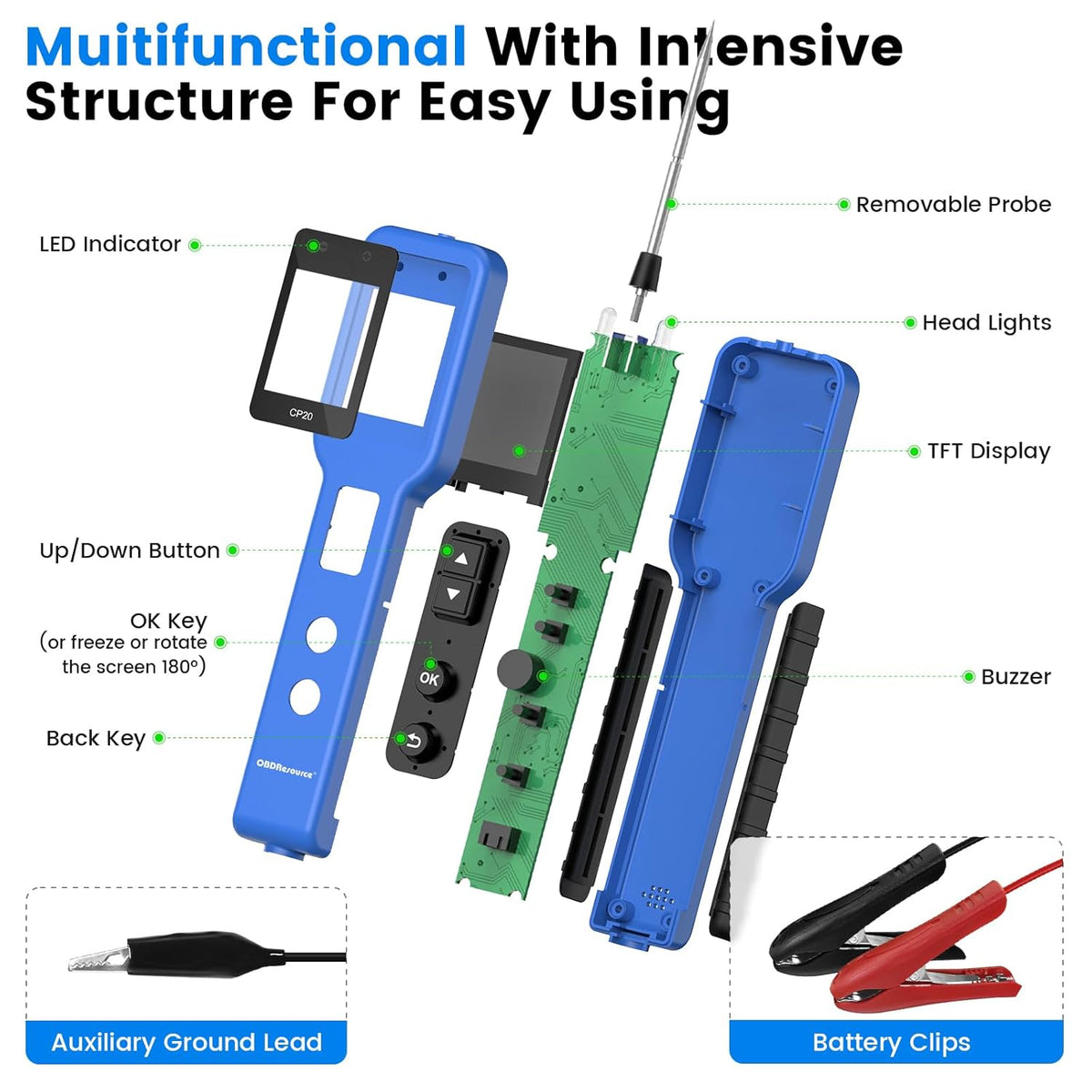
- Clear Visual and Audible Feedback – Read live data on the 2.4-inch color TFT display, with LED indicators and a built-in buzzer to support testing.
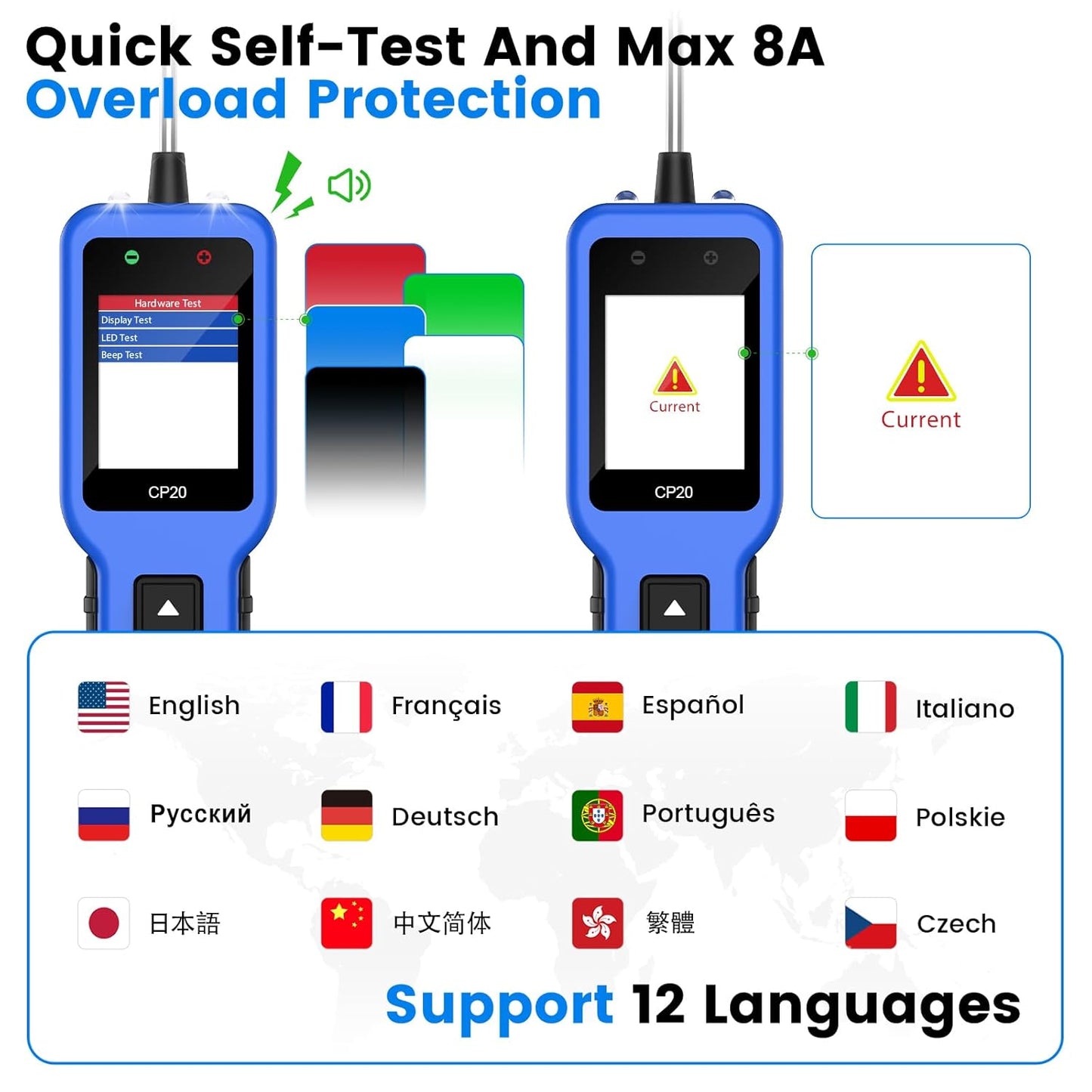
- Practical Workshop Design – A 16-foot cable provides reach around the vehicle, while LED illumination helps you see test points in darker areas. Supports 12 languages.
- Built-In Protection – Includes overcurrent, overtemperature, reverse-polarity, and excessive-input-voltage protection.
Applications
- Checking voltage and polarity at accessible circuit test points
- Testing wiring continuity, resistance, and diodes
- Inspecting supported sensor and injector signals
- Checking signal frequency and duty cycle
- Performing CAN bus polarity checks
- Activating compatible components to help isolate electrical faults
- Supporting repair shop diagnostics, mobile repairs, DIY maintenance, and technical training
Compatibility
The CP20 is designed for compatible 12V and 24V vehicle electrical systems, including those found in cars, pickup trucks, commercial trucks, motorcycles, boats, and construction equipment.
Compatibility depends on the circuit voltage, signal type, component requirements, and test method. The 0–80V specification describes the voltage measurement range; it does not mean every circuit or component within that range can be powered or activated by the tool.
How to Use
- Identify the circuit. Check the vehicle wiring information, expected voltage, and correct test points before connecting the tool.
- Connect the CP20. Follow the user manual to connect the power leads to a suitable vehicle power source, observing correct polarity.
- Select the operating mode. Choose Multimeter & Oscilloscope mode for measurements and signal inspection, or Component Activation mode for a compatible component test.
- Select the function and test point. Follow the connection procedure for the selected test. For resistance, diode, and continuity checks, de-energize and isolate the circuit as required.
- Read the results. Review the displayed values or waveform and compare them with the vehicle’s service specifications.
- Activate only when appropriate. Verify the component’s pinout, voltage, and current requirements before using activation mode. Stop the test if a protection warning occurs.
Technical Specifications
| Brand | OBDResource |
|---|---|
| Model | CP20 |
| Product Type | 4-in-1 automotive digital circuit tester |
| Vehicle Electrical Systems | 12V / 24V |
| Voltage Measurement Range | 0–80V |
| Operating Modes | Multimeter & Oscilloscope; Component Activation |
| Multimeter Functions | Voltage, resistance, diode, continuity, polarity, frequency |
| Additional Readings | Maximum/minimum voltage, frequency, duty cycle |
| Signal Monitoring | Supported camshaft, crankshaft, injector, and throttle signals |
| CAN Bus Function | Polarity detection |
| Display | 2.4-inch color TFT LCD |
| Cable Length | 16 ft / approximately 4.9 m |
| Language Support | 12 languages |
| Indicators and Lighting | LED indicators, built-in buzzer, LED illumination |
| Protection Features | Overcurrent, overtemperature, reverse polarity, excessive input voltage |
What’s in the Box
- OBDResource CP20 Automotive Digital Circuit Tester with 16-foot cable
Important Notes
- Measurement range and activation output are different. The 0–80V measurement specification is not an 80V power supply or activation rating.
- Use the correct test mode. Component activation applies electrical power and must only be used where the vehicle service procedure permits it. Do not apply activation power to CAN communication lines or sensor signal circuits.
- Protection does not replace correct connections. Follow the manual’s operating limits and confirm circuit requirements before testing.
- CAN polarity detection is a circuit check. It should not be treated as CAN message decoding or a complete network diagnosis.
- Compare results with service data. Readings and component response should be evaluated against the vehicle manufacturer’s specifications.
FAQ
What does the CP20 combine in one tool?
A digital multimeter, digital oscilloscope, automotive circuit tester, and component activation tool.
Can I use it on both 12V and 24V vehicles?
Yes. The CP20 is designed for compatible 12V and 24V vehicle electrical systems. Confirm the requirements of the individual circuit before testing.
What signals can I inspect?
The CP20 supports monitoring of compatible camshaft, crankshaft, injector, and throttle signals. It also provides CAN bus polarity detection.
Which components can I activate?
Compatible lights, motors, wipers, cooling fans, relays, and injectors, provided their voltage and current requirements are within the tool’s limits and the correct test procedure is followed.
Does the CP20 supply up to 80V for component activation?
No. The 0–80V specification refers to voltage measurement. Consult the user manual for activation output limits.
Is it suitable for DIY use?
The color display and audible feedback make results easier to follow. Users should still understand basic automotive electrical testing, especially before using component activation.
PRODUCT OWNERSHIP
Resources & Support
Find product documentation, available updates and technical help.




This is a great tool to add to the collection. I know I will need this to test my car Batteries from time to time. This tool gets powered up by connecting to your battery, so it’ll be a blank screen until successful connection . I also can use this to diagnose other power-related car issues like engine starters or faulty alternators. The device is easy to use in that there is a simple instruction booklet that breaks down how to run all tests. If a dunce like me can understand it, Youll do just fine! I’m taking off one star only because there is no convenient way to store this tool. I wish it came with a little satchel so I wouldn’t have to bunch all the wiring up and throw it in the box with other tools.


This is the best automotive test probe that I have seen! I have a few different types of these probes and this is by far the most versatile. I have the CT03, the CP10 and now this CP20 probe.The CT03 is not a great probe. It does work and but the voltmeter on this probe is completely useless. All it does is tell you the voltage of the battery. It does not measure the voltage of what the tip is touching. I don't recommend the CT03.The CP10 is made by the same company as this CP20 probe. The CP10 is essentially the same as the CT03, but the voltmeter on the CP10 actually measures the voltage of what the probe is touching, like it should be! This is pretty much what a basic power probe should be.However, this CP20 probe is much more functional than either of those. The CP20 has many more functions. (See the pictures!). This probe can do everything the CP10 can do, along with measuring resistance, diodes, frequency, etc. It also has an oscilloscope display so you can see how the signal you are measuring changes with time. The oscilloscope would be very nice to have when looking at fuel injectors and other things like that in modern cars that use pulse width modulation.It already has lights that indicate whether the probe is touching ground or +12V, but it also has a special P-N mode that displays the voltage on the main display and also beeps to indicate whether you are touching positive voltage or a different beep for ground. This could be very handy in situations you can see the probe itself as the sounds will tell you what you are touching with the probe.This probe should be in every mechanics tool box that works on modern cars or power equipment.This a great value at this price, very functional and easy to use!Recommended.


I’ve had my eye on one of these circuit testers for a while, but as a weekend warrior, I couldn’t justify the price of the high-end models. This one hit the sweet spot—affordable, packed with features, and does exactly what I need. It’s got a wide voltage range (12V–80V), and covers everything from continuity and polarity to grounding and diode testing. Honestly, it has more functions than I currently know how to use, which makes me feel like I bought a tool and a reason to learn something new.So far, it’s worked flawlessly. The build quality feels solid, and it’s intuitive enough for someone who doesn’t live under the hood full-time. My only gripe? No carry case. This thing deserves a little protection when it’s not in action—right now it’s living in a ziplock bag, which feels like a disservice. Still, for the price and performance, I’m very happy. 5 stars and no regrets.


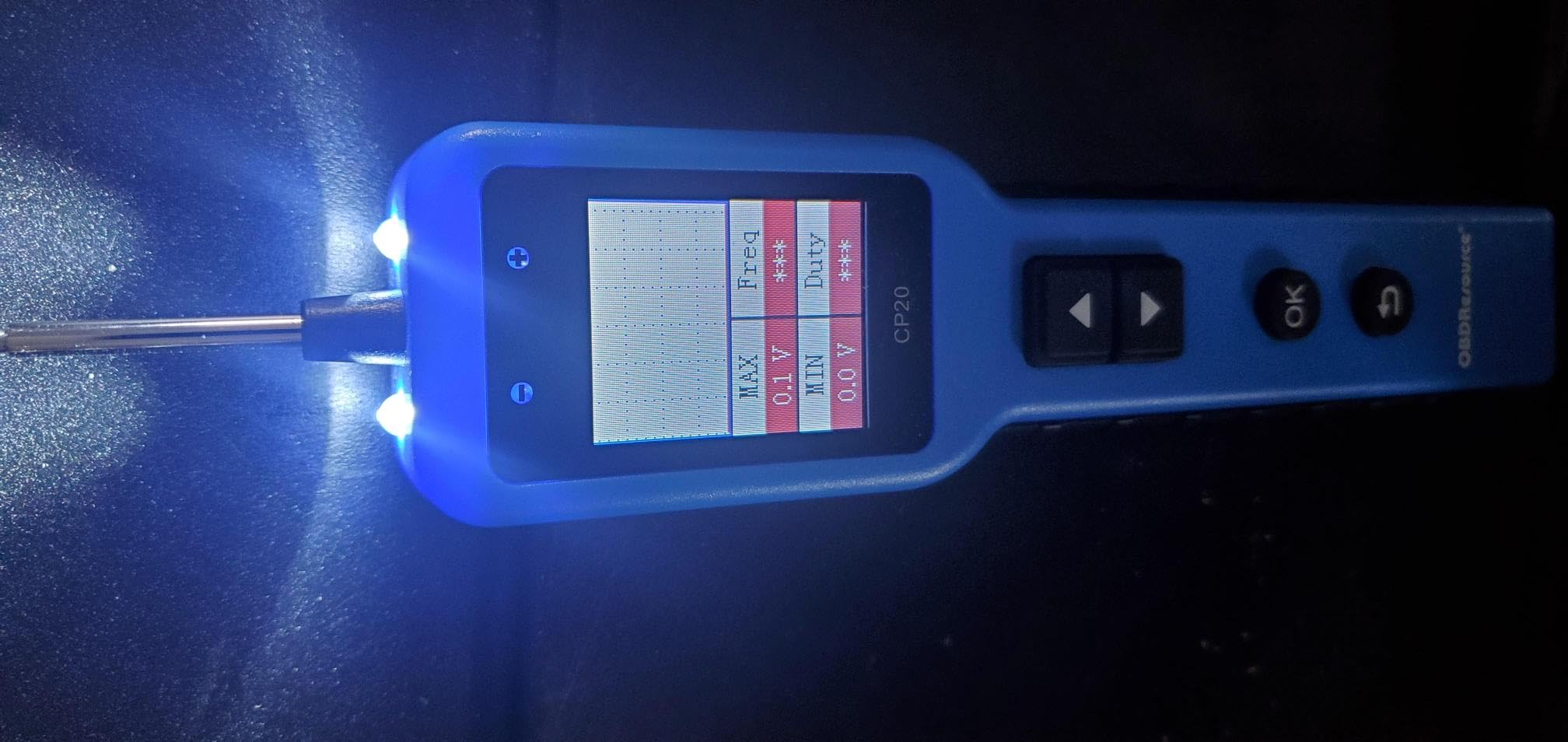
I like having this circuit tester in my toolkit—it makes diagnosing car electrical issues so much simpler. It’s versatile enough to check continuity, polarity, grounding, and even fuses, which is great for someone like me who works on cars sometimes. I’ve used it personally on a couple of older vehicles, and it’s accurate and straightforward. The probe feels sturdy, and the readouts are clear. It’s saved me from a few frustrating trips to the shop, and the compact size makes it easy to store in the glove compartment. Honestly, it’s one of those little tools that feels indispensable once you start using it.
This is an upgrade from a basic tester in that it has more functions like resistance and a graphing feature. The digital display means you know exactly what the voltage is at all times. There are also LEDs to show you polarity as a go no go test. A flashlight on the end helps you see the probe tip in dark conditions. The cable length should be enough in most automotive applications. It seems to be well made and is very easy to use.
Way better than using the 12v test light. Essentially a multimeter in a very compact convenient form factor with a plus of having a limited use oscilloscope as well as a light to illuminate what you are trying to test.. Would buy again especially when on sale. The probe is very good in small places like the car's fuse box.
Having the ability to do a continuity check between far ends of the vehicle has been a godsend for diagnosing odd electrical gremlins.This is an excellent addition to my mechanical toolkit.It seems to be built fairly well and should hold up to casual shop use.The built in oscilloscope functionality is quite nice and should prove handy for diagnosing intermittent issues or signal levels on certain types of sensors (O2, etc)There's no storage function, so you'll have to just take pictures of the output. Not a big deal, but would've been convenient if it had the ability.Quite easy to use and has all the clips and such you'll need for general automotive testing.A decent value for what you get. Especially for the oscilloscope function.
I am extremely pleased with this tester. I own many electronic testers ranging from $5 to $5000, and in the price range of this one, it may be the best and most versatile I've found.This precision tester is capable of testing up to 80V DC which allows for use with not only automotive, motorcycle and truck/trailer power systems, but also DC electric bikes and scooters, commercial and industrial DC systems, telecom and cable systems, and DC-battery-based home backup power systems commonly found from 48-72vdc. I work on equipment from ALL of these industries and it's wonderful having one tool that I can use on everything without risking damage to either tool or equipment.I have tested this product extensively and find it wanting for nothing. It is reasonably accurate as compared to my much more expensive testers, it performs voltage and continuity testing, offers a feature for tracking short circuits (which is a bit finicky, read the instruction manual) and has the ability for providing both power and ground for off-equipment component testing which is invaluable when troubleshooting. Having a built in ohmmeter is extremely handy, and the audio function is nice to give you that little extra assurance of a connection made, or when you need to look at something else while testing. The one thing I haven't tested is the oscilloscope function, I rarely have use for this but I look forward to trying it. If it works as good as the rest of it, it will be fantastic.The display is bright and clear, the controls are intuitive and easy to use, the cables and clamps are decent quality, and the whole package is really well put together.This is by far the most diverse, complete testing unit I have found in this price range. Everyone who works on anything electrical should have one in their bag, especially at this price. What a tremendous value.